
Windeo – Une fenêtre connectée pour la météo
Job : UX Designer étudiant | Projet étudiant élu meilleur projet de la promo
Un projet étudiant IoT qui transforme votre fenêtre en assistant météo passif avec un mini projecteur, un Raspberry, une application et du Arduino
Contexte & Défis
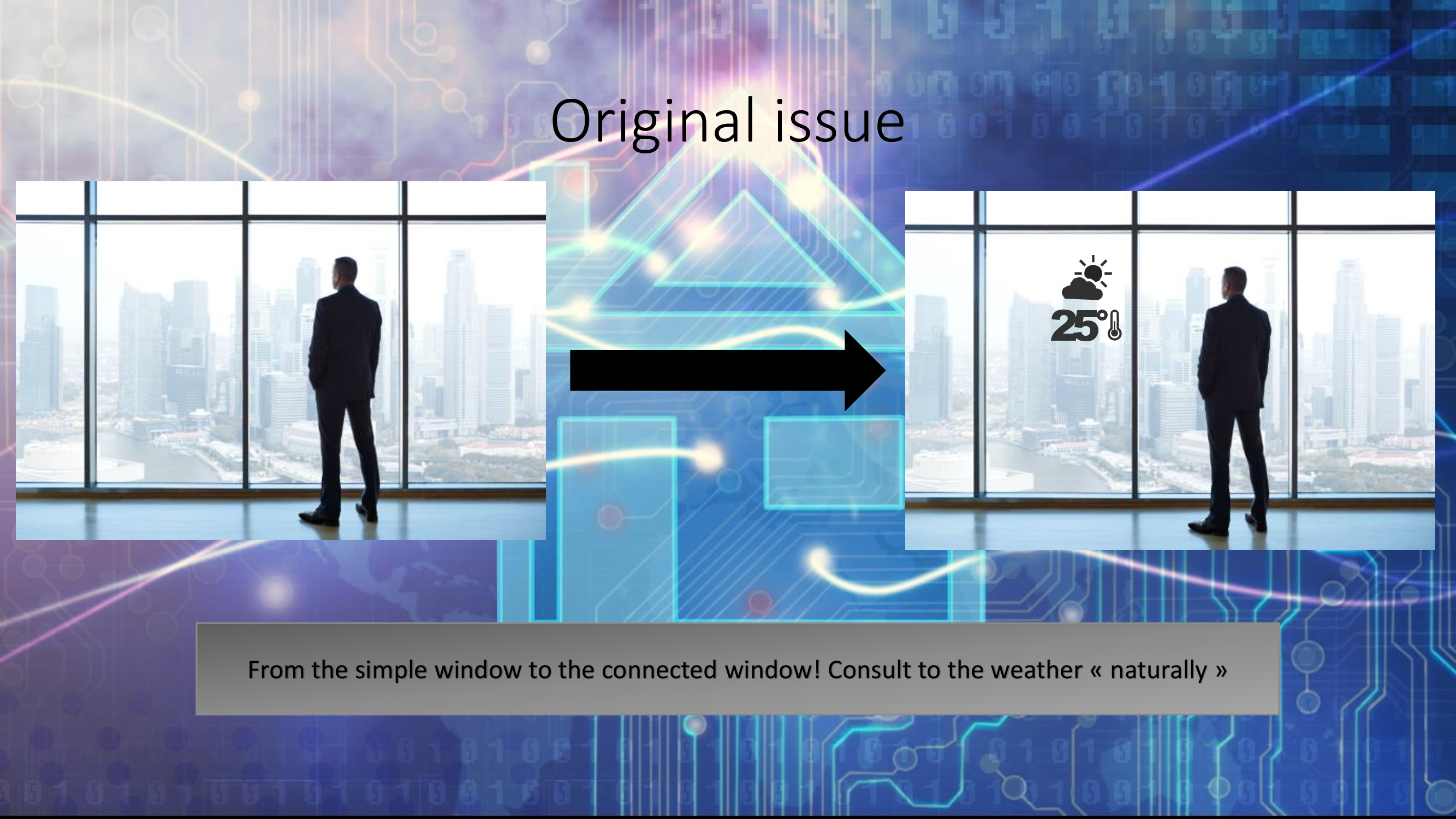
Comment afficher la météo sans écran, sans clic et sans distraction ?
Windeo projette les informations météo et des conseils vestimentaires directement sur une fenêtre grâce à un système
Raspberry Pi + Arduino.
Le principal défi : rendre ces données lisibles en pleine lumière et intuitives sans interaction.
Ma contribution
J’ai conduit l’ensemble de la démarche UX : de la recherche terrain à la conception finale.
Mon rôle a été de trouver l’équilibre entre ergonomie, technologie et contexte d’usage réel.
- Interviews avec étudiants et enseignants sur leurs routines quotidiennes
- Observation des usages dans différents environnements lumineux
- Création de personas centrés sur les besoins implicites (pas d’interaction)
- Tests de lisibilité sur surface vitrée
Impact & Résultats
- ✅ Note maximale au module, saluant l’approche “UX invisible”
- ✅ Présenté au Hackathon 2018 avec retours très positifs
- ✅ Renforcement des compétences en design pour objets connectés
- ✅ Compréhension approfondie de la relation entre interface et environnement
Design final


Windeo – A Smart Window for Weather
Job: Student UX Designer | Awarded Best Project of the Class
An IoT student project turning your window into a passive weather assistant using a mini projector, a Raspberry Pi, an app, and Arduino.
Context & Challenges
How can we display the weather without a screen, clicks, or distraction?
Windeo projects live weather information and clothing advice directly onto a window using a
Raspberry Pi + Arduino system.
The main challenge: making this information readable in daylight and intuitive without interaction.
My Contribution
I led the entire UX process — from field research to final design.
My goal was to find the right balance between usability, technology, and real-life context.
- Interviews with students and teachers about their daily routines
- Observation of usage in different lighting environments
- Creation of personas focused on implicit needs (no interaction)
- Readability testing directly on glass surfaces
Impact & Results
- ✅ Highest grade in the class, highlighting its “invisible UX” approach
- ✅ Showcased at Hackathon 2018 with excellent feedback
- ✅ Strengthened expertise in UX for connected and embedded devices
- ✅ Deepened understanding of the link between interface and environment
Final design
À propos de mon rôle dans ce projet et mon ressenti global
En tant que UX Designer dans le cadre de mon projet de cours en IoT, j’ai eu l’opportunité de travailler sur Windeo, un projet mêlant technologies embarquées et vie quotidienne. J’étais responsable de la conception et de l’expérience utilisateur, avec pour objectif de garantir que les informations projetées sur la fenêtre soient claires, intuitives et accessibles.
- ✅ En tant que UX Designer (pendant toute la durée du projet) : J’ai dirigé le processus de design, en me concentrant sur l’interface de projection affichant la météo et les recommandations vestimentaires. Mon rôle consistait à créer une expérience fluide pour les utilisateurs, sans interaction, simplement en regardant la fenêtre.
Le principal défi était de concevoir une interface à la fois pertinente et lisible, permettant aux utilisateurs d’interpréter facilement les données projetées, sans aucune action de leur part. J’ai collaboré avec l’équipe technique pour garantir la faisabilité et l’efficacité du design dans des conditions réelles.
Problématique
Le défi était d’offrir un moyen simple d’obtenir la météo et des conseils vestimentaires, sans passer par un smartphone ou un ordinateur. En projetant ces informations directement sur une fenêtre, nous voulions simplifier l’expérience et aider les utilisateurs à faire des choix rapidement avant de sortir.
Défis et contexte
Le principal défi consistait à intégrer cette technologie dans le quotidien de manière fluide. L’affichage devait être lisible dans différentes conditions de luminosité, notamment à la lumière du jour. Il fallait également que le système soit entièrement passif, sans interaction physique de l’utilisateur.
Recherche utilisateur et collecte des besoins
Pour concevoir un système pertinent, nous avons mené une recherche utilisateur afin de mieux comprendre leurs habitudes pour consulter la météo et s’habiller. Nous avons échangé avec plusieurs profils pour comprendre leurs attentes vis-à-vis de l’affichage Windeo.
Nous avons combiné différentes méthodes, comme des entretiens informels et de l’observation. Voici un aperçu :
- ✅ Entretiens : Avec des étudiants, jeunes actifs, seniors – afin de connaître leurs habitudes pour vérifier la météo et s’habiller.
- ✅ Observations : Observation de leurs usages autour de la fenêtre, de leurs routines matinales, etc.
- ✅ Retours d’experts : Notre professeur (PhD) expert en IoT nous a aidés à garantir la faisabilité technique du design.
Ce que nous avons appris
- ✅ Besoin de simplicité : Les utilisateurs veulent un affichage sans effort, sans avoir à consulter leur téléphone.
- ✅ Lisibilité cruciale : Le contenu projeté doit être clair, même selon les conditions de lumière.
- ✅ Interaction passive : Aucun geste, aucune interface. Juste regarder la fenêtre suffit.
Personas
Pour mieux comprendre nos utilisateurs, nous avons créé deux personas :
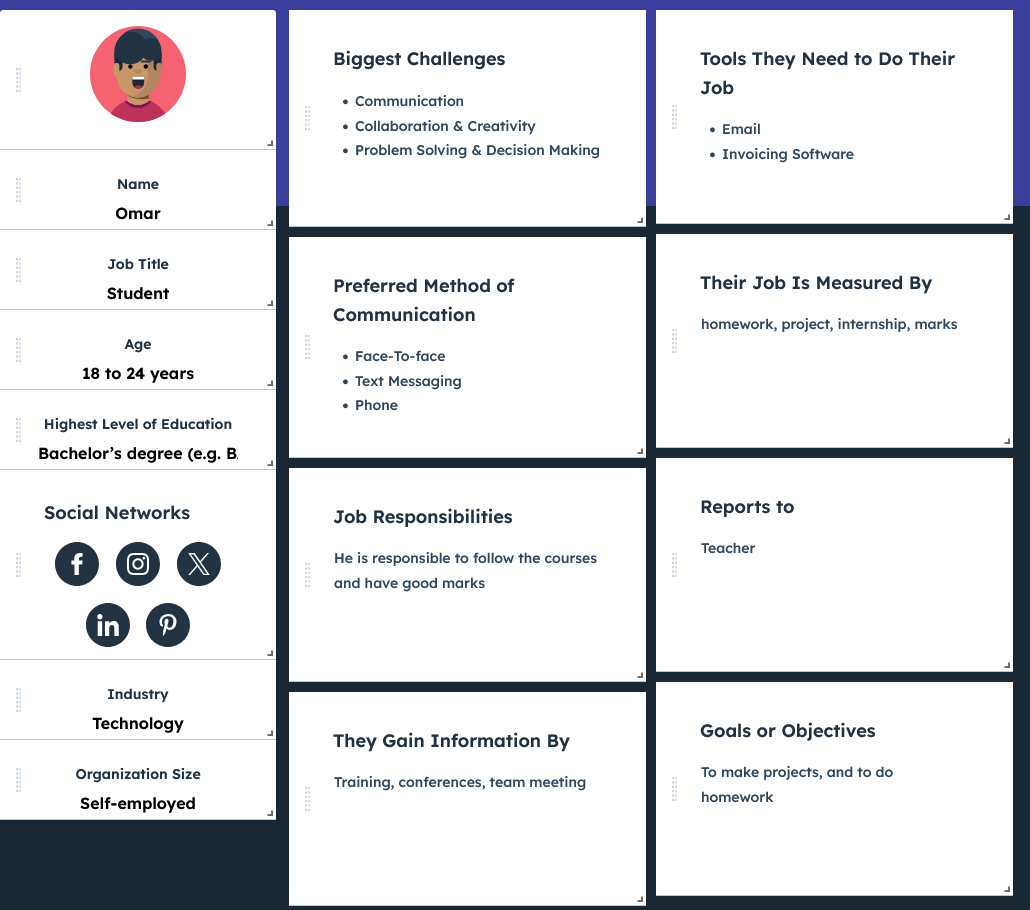
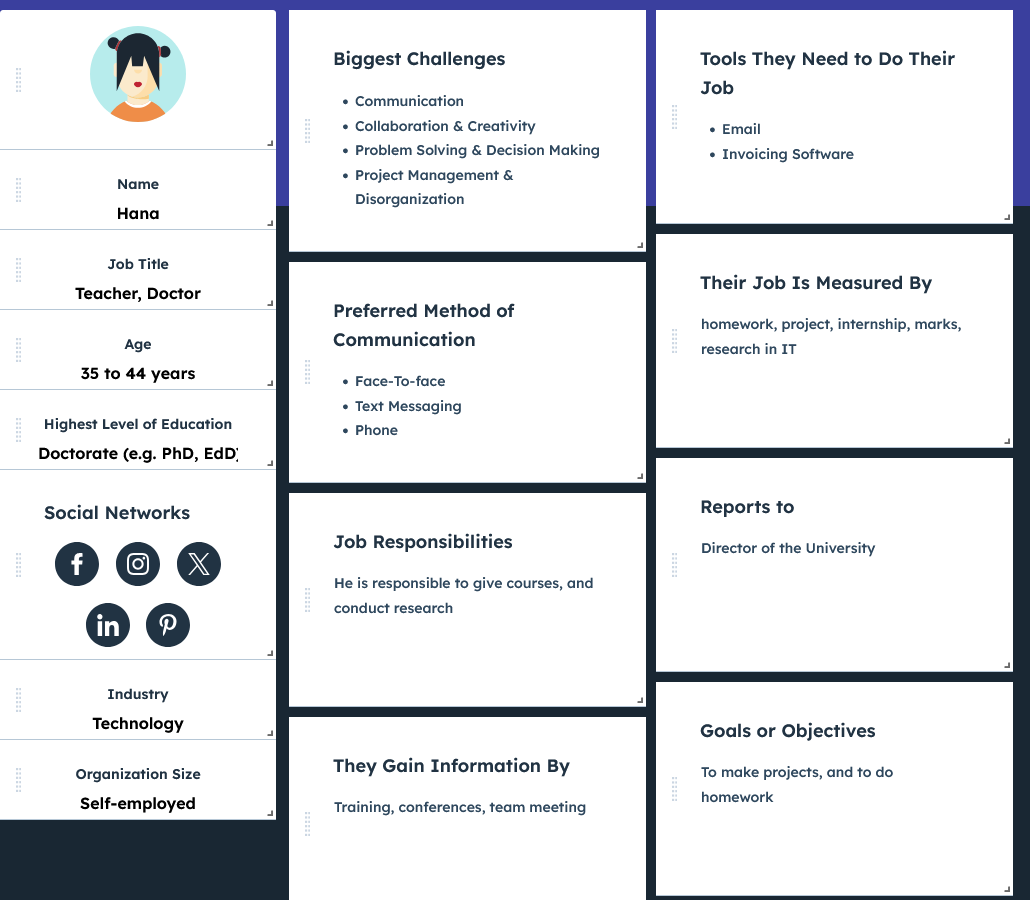
Parcours utilisateur
Omar – Étudiant
Phase : Consulter la météo sur la fenêtre
- Émotions : 🙂 Curieux, 🙂 Rassuré
- Points de friction : Aucun, le système fonctionne sans interaction.
- Opportunités : ✅ Affichage concis et clair pour choisir rapidement une tenue adaptée.
Hana – Enseignante
Phase : Vérifie la météo projetée sur la fenêtre
- Émotions : 🙂 Curieuse, 🙂 Satisfaite
- Points de friction : Aucun, la simplicité est au cœur du système.
- Opportunités : ✅ Recommandations claires pour s’habiller efficacement dès le matin.
Solution et fonctionnalités
L’objectif était de créer une fenêtre connectée qui affiche les données météo et les conseils vestimentaires. Voici les points clés :
- Intégration d’un Raspberry Pi + Arduino pour afficher la météo via mini-projecteur.
- Données en temps réel et recommandations selon la température.
- Affichage lisible et accessible (typographie, contraste, distance).
- Interface passive : aucun clic, aucun bouton.
- Adaptable à toute fenêtre, quelle que soit sa taille ou son emplacement.
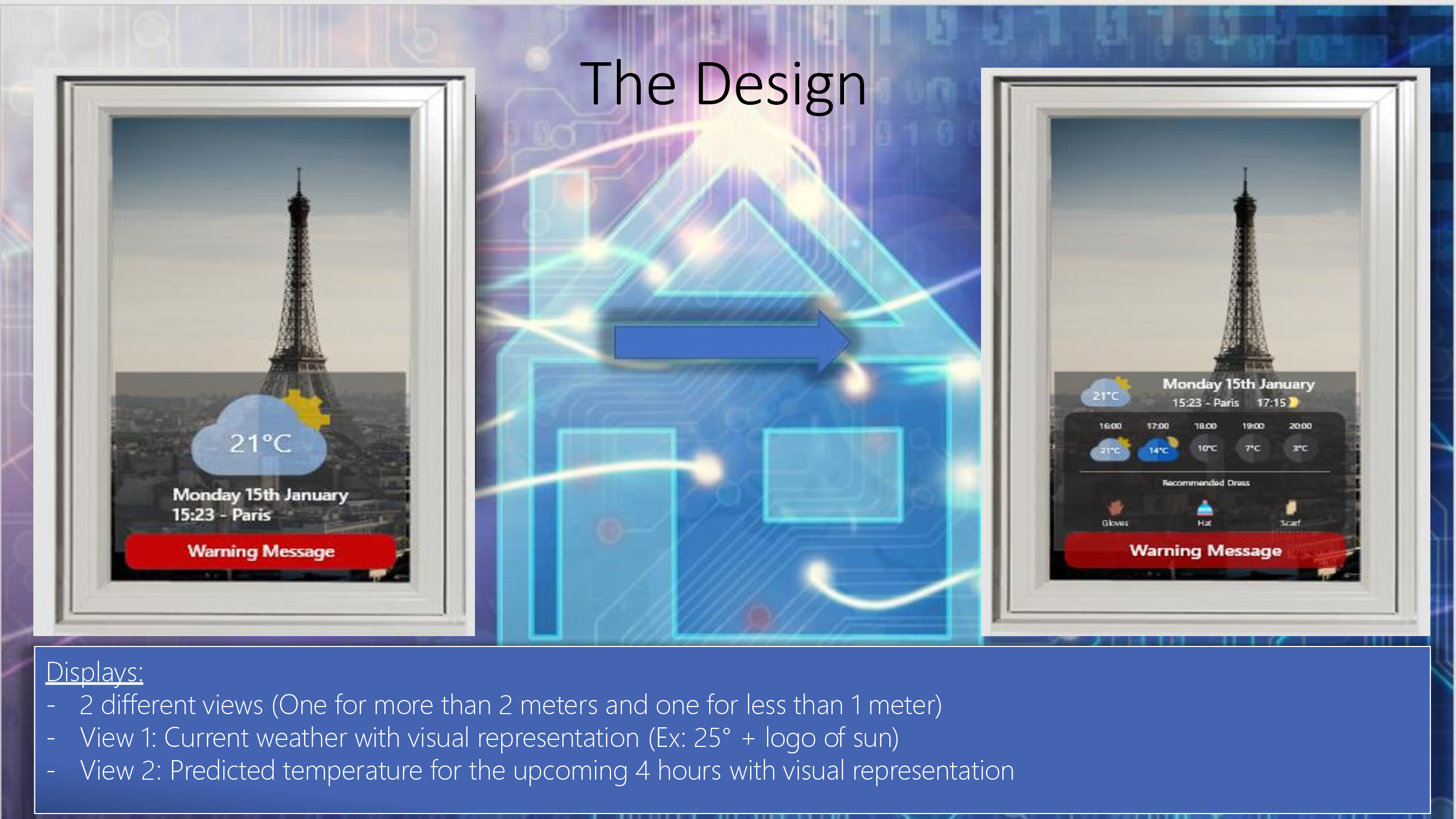
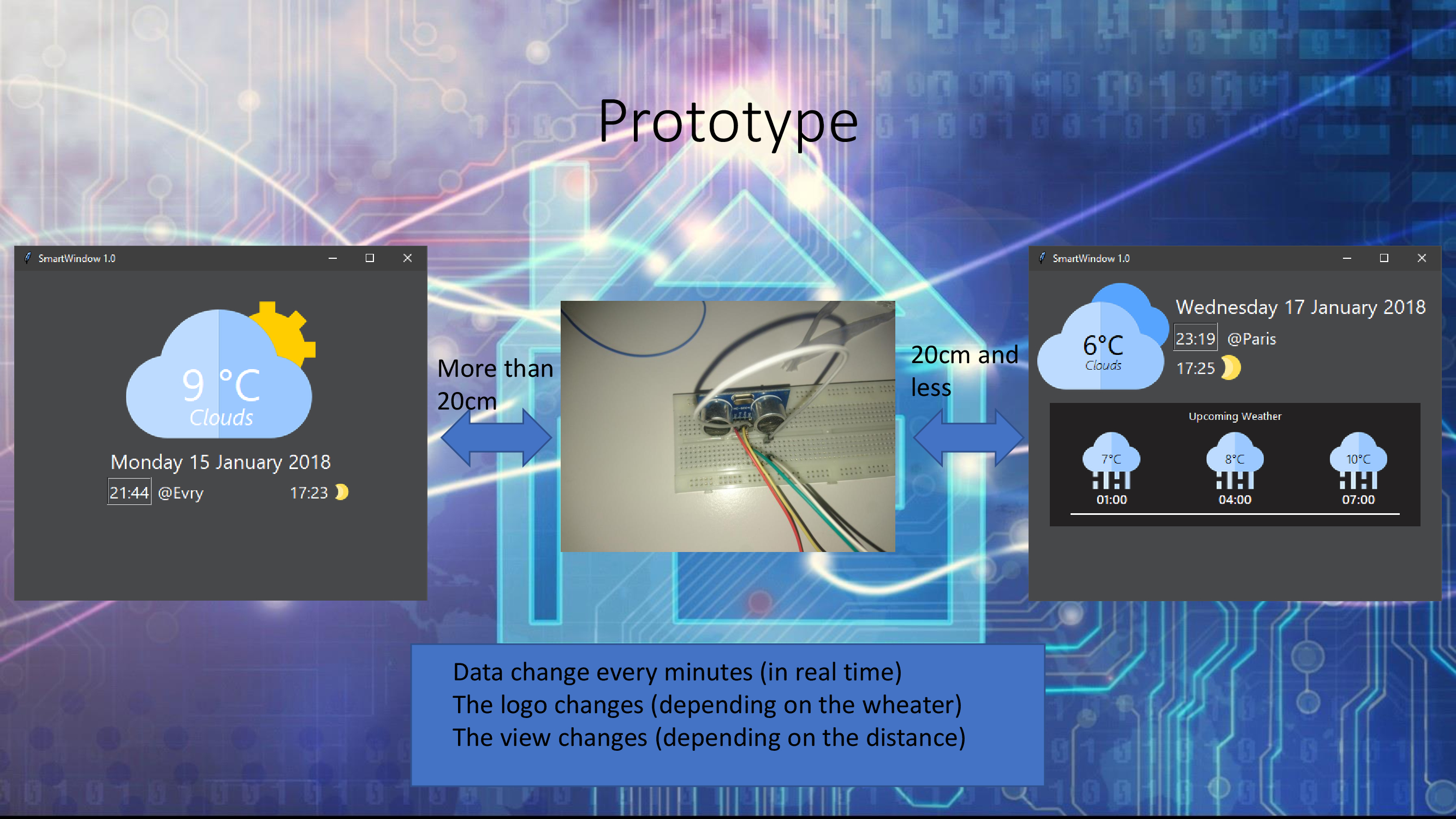
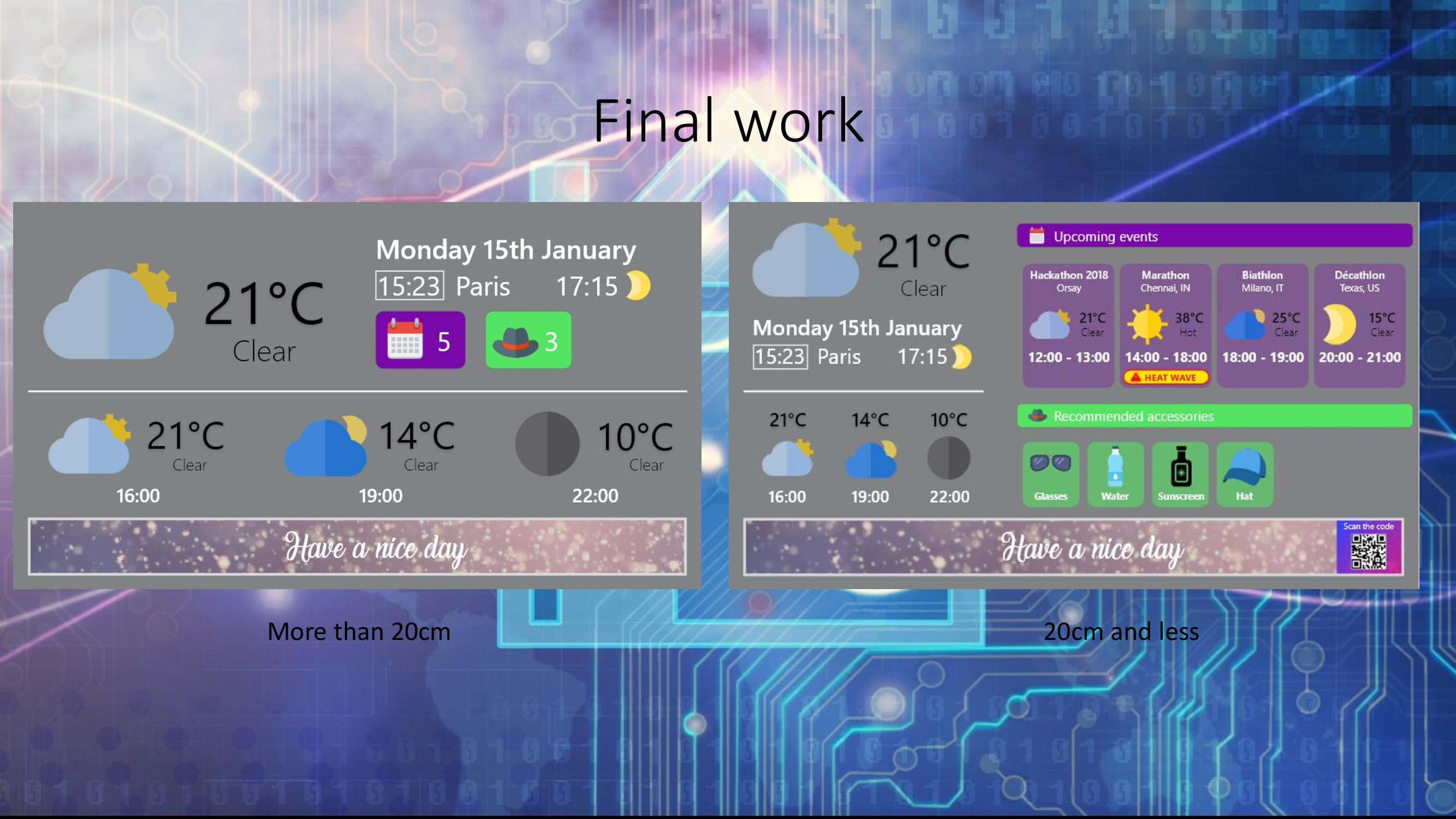
- Un capteur de distance adapte l’affichage selon que l’on est à 1m ou à 2m.
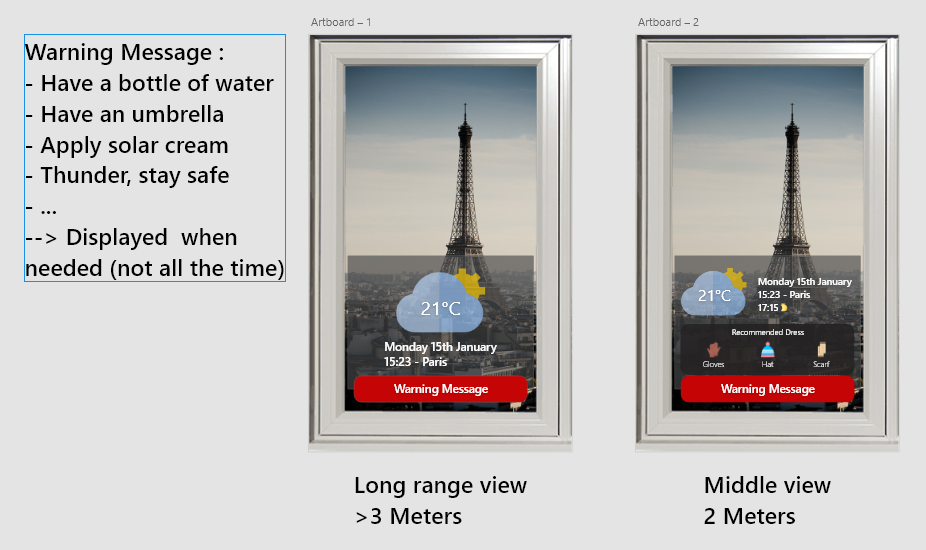
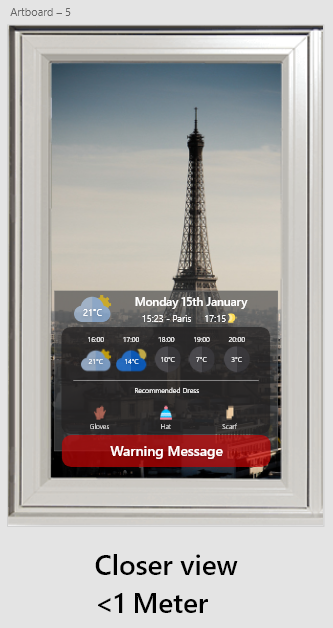
Maquettes et présentation
Voici les maquettes et la présentation du projet :
Tests, résultats et impact
Windeo a réussi à combiner technologie embarquée et usage quotidien. Grâce à la projection passive, les utilisateurs peuvent prendre une décision rapide avant de sortir, sans téléphone ni écran.
Méthodologie de test
Le système a été testé avec Raspberry Pi et Arduino pour afficher les informations météo sur une vraie fenêtre. Plusieurs utilisateurs ont été observés pour évaluer la lisibilité et la compréhension.
Retours utilisateurs
Les utilisateurs ont salué la simplicité du système. Le fait de voir immédiatement les infos utiles sur la fenêtre, sans ouvrir une application, a été perçu comme très pratique.
Défis rencontrés
La lisibilité selon la lumière du jour était un vrai défi. Le prototype fonctionnait très bien en intérieur, mais demandait des ajustements pour l’extérieur.
Améliorations clés
L’affichage a été optimisé selon l’heure de la journée et la luminosité ambiante. Le script Python a aussi été amélioré pour des recommandations plus précises.
Impact
- ✅ Note maximale obtenue en cours, saluant l’innovation technologique.
- ✅ Présenté au Hackathon 2018 (retours très positifs).
- ✅ Équipe renforcée sur la présentation d’un produit innovant.
- ✅ Meilleure compréhension de l’UX invisible et des systèmes embarqués.
Outils utilisés
- ✅ MakeMyPersona (Hubspot) pour les personas
- ✅ Photoshop pour les maquettes
- ✅ Raspberry Pi pour l’affichage
- ✅ Arduino pour les capteurs
- ✅ Outils Microsoft (Forms, Teams, Whiteboard)
About my role in this project and my global feeling
As a UX Designer in my IoT course project, I had the opportunity to work on Windeo, a project that integrated embedded technology with everyday life. I was in charge of the design and user experience aspects of the project, ensuring that the information displayed on the window was clear, intuitive, and accessible to users.
- ✅ As UX Designer (for the entire project duration): I led the design process, focusing on the projection interface that displayed weather information and clothing recommendations. My role was to create a seamless experience for users who would interact with the display by simply looking at the window.
The main challenge was to design an interface that provided relevant and clear information, ensuring that users could easily interpret the data projected onto the window without the need for interaction. I collaborated closely with the team to implement the technical solution and make sure the design was functional in real-world scenarios.
Problem Statement
The challenge was to provide an easy way for users to get weather updates and clothing recommendations without needing to interact with a smartphone or computer. By projecting this information directly onto the window, we aimed to simplify the user experience and help them make informed decisions about what to wear when leaving the house.
Challenges and Context
The main challenge we faced was integrating the technology seamlessly into everyday life. The goal was to ensure that the display was legible and effective in various lighting conditions, especially in natural sunlight. We also needed to make sure that the system was easy to use and required no physical interaction from the user.
User Research and Needs Gathering
To design a system that met the needs of our users, we conducted research to better understand their preferences for checking the weather and making decisions about what to wear. We spoke with various individuals to gain insight into their daily routines and expectations for the Windeo display.
To gather valuable feedback, we used a variety of research methods, including informal interviews and observational studies. Here’s an overview of the steps we took:
- ✅ User Interviews: We conducted interviews with individuals from different age groups and backgrounds, including students, young professionals, and older adults. The goal was to understand how they currently check the weather and make decisions about what to wear.
- ✅ Observational Studies: We observed people interacting with their windows and checking the weather, focusing on their needs and behavior. This helped us identify key design features for the Windeo project.
- ✅ Feedback from IoT Experts (our PhD professor): We consulted with experts in embedded technology to ensure that the design would be feasible and effective in the context of the hardware and software we were using.
What We Learned
Through our research, we identified several key insights:
- ✅ Simplified User Needs: Users wanted an effortless way to check the weather and receive clothing suggestions without interacting with their smartphones or other devices.
- ✅ Visual Clarity is Crucial: The projected information needed to be legible and easily understood, even in varying lighting conditions.
- ✅ Passive Interaction: The display needed to work passively, meaning users would not need to physically touch or engage with the system, just glance at it.
User Personas
To better understand the different types of users, we created personas. These profiles allowed us to define the specific needs and goals of each user group and tailor the tool to their objectives.
User Journey Mapping
Omar - Student
Phase: Check window for weather information
- Emotions: 🙂 Curious, 🙂 Reassured
- Pain points: None, as the system works seamlessly without the need for interaction.
- Opportunities: ✅ Provide clear and concise weather information, allowing for quick decision-making about appropriate attire.
Hana - Teacher
Phase: Check window for weather information
- Emotions: 🙂 Curious, 🙂 Satisfied
- Pain points: None, as the system is designed for easy access to information without unnecessary complexity.
- Opportunities: ✅ Display clear weather and clothing recommendations to make dressing decisions faster and more efficient.
Solution & Features
The goal of the Windeo project was to create a smart window display system that provides users with real-time weather data and clothing recommendations. The idea was to leverage the window as a passive, non-interactive display, making it easy for users to quickly glance and gather the information they need before heading outside. The primary objectives were to:
- Integrate a Raspberry Pi and Arduino to display weather data on a window using a mini projector.
- Provide real-time temperature and clothing suggestions based on the weather conditions.
- Ensure the information was easily readable and accessible, with clear and intuitive recommendations.
- Design a simple yet effective user interface that didn’t require any interaction, making it suitable for all users, including children and the elderly.
- Create a practical solution that could be implemented on any window, regardless of size or location.
- Depending on your distance, you will have more or less information displayed, with Arduino we added a sensor for distance calculation.
Mockups & Project Presentation
Below are the mockups & presentation of our product.
Test, Impact and Results
The Windeo project successfully integrated embedded technology with everyday life, offering users an intuitive way to check weather information and receive clothing recommendations directly on their window. The simplicity of the interface, paired with the novelty of projecting information on the window, provided a seamless experience for users, helping them make informed decisions before going outside.
Test Methodology
The project was tested by displaying weather data and clothing recommendations on a window using a Raspberry Pi and an Arduino setup. We tested the system with a variety of users, focusing on how effectively the window display communicated the relevant information and how easily users could interpret it without any interaction.
User Feedback
Users appreciated the simplicity and convenience of the system. They found it especially helpful to receive immediate, visible information on the window without having to look at a screen or phone. The recommendation to dress accordingly based on the weather was well-received and felt like a practical addition to the experience.
Challenges
One of the main challenges faced was ensuring the visibility and legibility of the projected information under different lighting conditions. Additionally, while the technology worked well in controlled environments, further testing was needed to optimize it for outdoor use under varying weather conditions.
Key Improvements
Improvements were made in optimizing the display for different times of the day, ensuring readability under varying light levels. Additionally, the Python code for the weather data was refined to provide more accurate and localized recommendations.
Impact
- ✅ The project received the highest grade in the class, a recognition of the innovative use of embedded technology.
- ✅ The system was showcased at the Hackathon 2018, where it received positive feedback, although we did not win.
- ✅ Despite not winning, the team gained valuable experience in presenting and defending an innovative product in a competitive setting.
- ✅ The project significantly improved the understanding of how embedded systems can be seamlessly integrated into daily life to aid decision-making.
Outils Utilisés
- ✅ MakeMyPersona (Hubspot) for personas design.
- ✅ Photoshop for screen design and branding adherence.
- ✅ Raspberry for development.
- ✅ Arduino for sensor.
- ✅ Microsoft tools for tests/reflection (Forms, Teams, Whiteboard).